![mosey_logo.svg]](https://support.mosey.com/hubfs/mosey_logo.svg)
The Mosey Mailroom gives you a centralized location for all your mail including state agency mail and registered agent mail. Long gone are the days of missing important deadlines because you lost a piece of mail (or maybe it fell behind your desk). Don't worry about who is checking the mail, or where the mail might be. With Mosey, your mail is always in the same place.
In addition to keeping your mail centralized, you are now able to assign mail pieces to specific team members and your team can mark mail pieces as "resolved" giving you peace of mind that those action items have been taken care of.
Follow the instructions below to migrate your existing accounts to receive letters and notices (snail mail) in Mosey.
Alabama
Alaska
Unemployment Insurance
Arizona
Withholding Tax
Unemployment Insurance
Arkansas
California
Withholding & Unemployment Insurance
Colorado
Denver Occupational Privileges Tax (OPT)
Connecticut
Unemployment Insurance
Delaware
District of Columbia (DC)
Unemployment Insurance & Paid Family & Medical Leave
Florida
Georgia
Hawaii
Idaho
Illinois
Withholding Tax & Unemployment Insurance
Indiana
Iowa
Kansas
Kentucky
Louisiana
Maine
Maryland
Massachusetts
Withholding Tax & Paid Family and Medical Leave
Michigan
Minnesota
Mississippi
Missouri
Montana
Nebraska
Nevada
New Hampshire
New Jersey
Withholding Tax & Unemployment Insurance
New Mexico
New York
Withholding Tax & Unemployment Insurance
North Carolina
North Dakota
Workers' Compensation Insurance
Ohio
Workers' Compensation Insurance
Oklahoma
Oregon
Withholding Tax & Unemployment Insurance
Pennsylvania
Rhode Island
South Carolina
South Dakota
Tennessee
Texas
Utah
Vermont
Virginia
Washington
Workers' Compensation Insurance
Unemployment Insurance & Paid Family and Medical Leave
West Virginia
Wisconsin
Wyoming
Alabama
Withholding Tax
1) Login to your My Alabama Tax account
2) Registration panel → Manage names & addresses → Addresses
3) Add/update the mailing address next to your Withholding Tax account to the Mosey Mailroom address → click Save
Unemployment Insurance
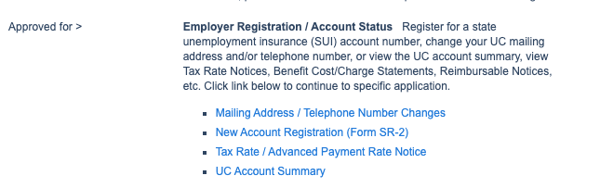
2) Under Employer Registration / Account Status → click Mailing Address / Telephone Number Changes
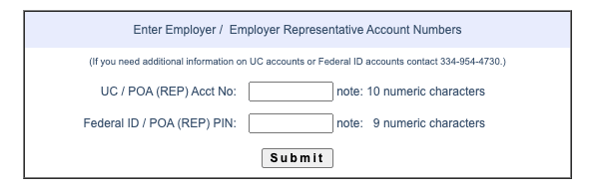
3) Enter UI account number and FEIN. If your account number is only nine-digit long, add a 0 before it.
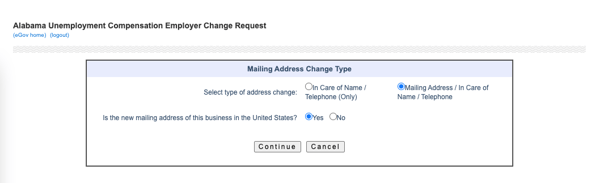
 4) Select Change/Update mailing address
5) Add your Mosey Mailroom address
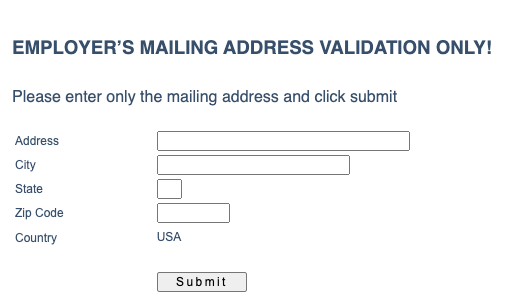
6) Confirm validated address
*Please note that any PMB or suite numbers may not show on the validation screen, however, these are saved in the system.
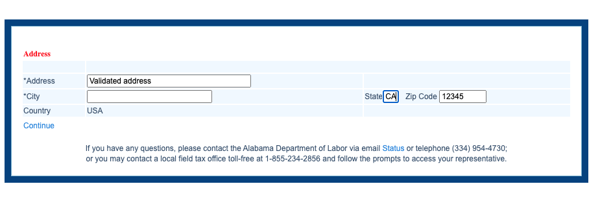 7) Enter contact information of the authorized submitter → click Submit
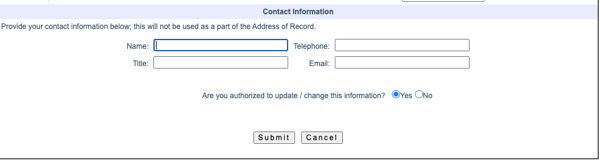
8) The address change request will be processed by end of business
Alaska
Unemployment Insurance
1) Log in to your myAlaska account.
2) Select "My Profile"
3) Scroll down to "Contact Information" and add the Mosey Mailroom mailing address.
Arizona
Withholding Tax
2) Click "View"
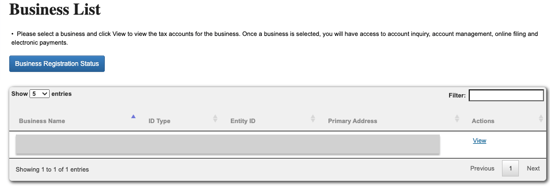
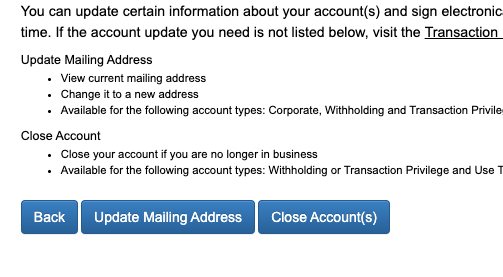
3) Click "Account Update."
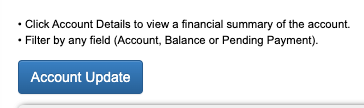
4) Click "Update Mailing Address."
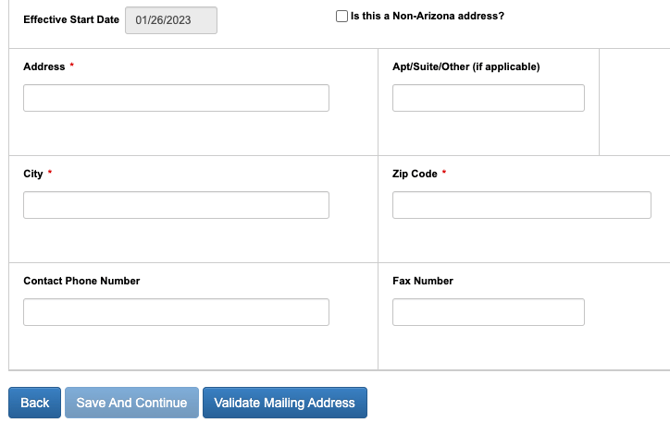
5) Click the check box next to the withholding account, enter your Mosey mailroom address, Validate Mailing Address, and click Save and continue

Unemployment Insurance
1) Log in to Tax and Wage System
2) File Report of Changes → Change employer info
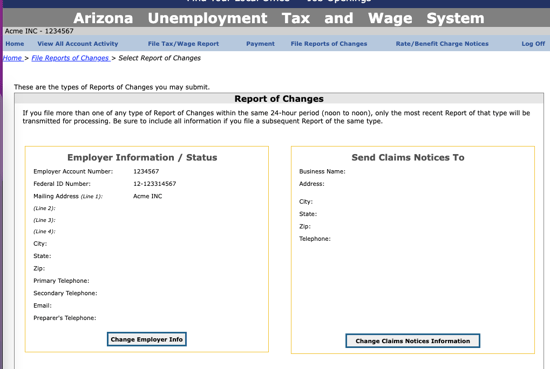
3) Change the mailing address to match your Mosey Mailroom address
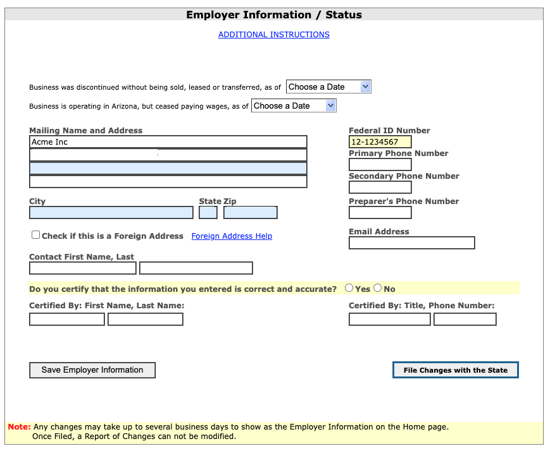
4) Enter contact and certifier (submitter) information → click File Changes with the State. Please note: It may take a few days for AZ to update your mailing address.
Arkansas
Withholding Tax
1) Log in to Arkansas Taxpayer Access Point
2) Select the Names & addresses tab
3) Add/update the mailing address next to your Withholding Tax account to your Mosey mailroom address → click Save
Unemployment Insurance
1) Log in to your UI/Tax 21 account
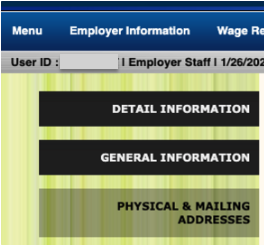
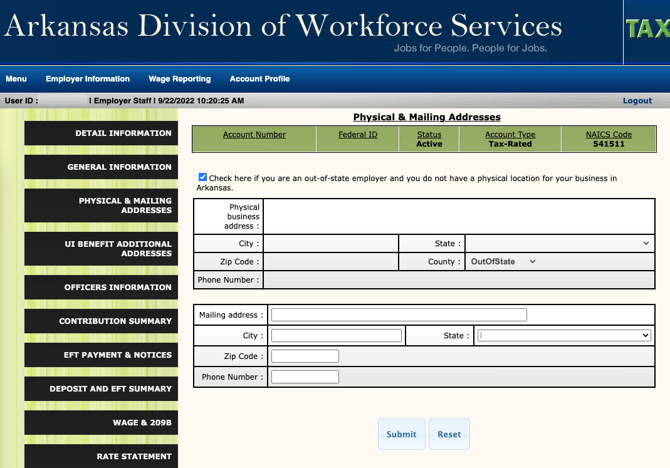
2) Employer Information → Physical & Mailing address
3) Enter your Mosey Mailroom address → click "Submit."
California
Withholding Tax & Unemployment Insurance
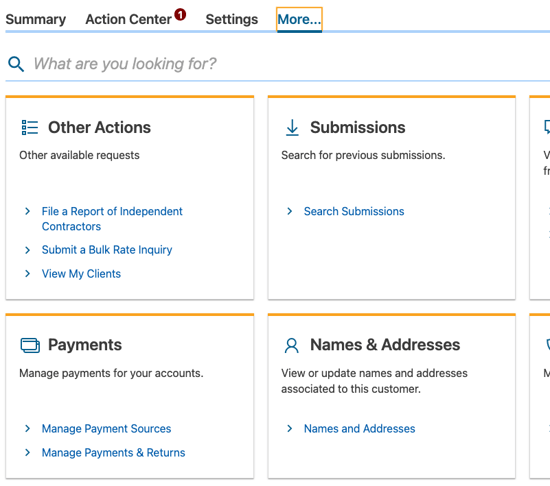
2) Click "More" → "Names & Addresses" → "Names & Addresses"
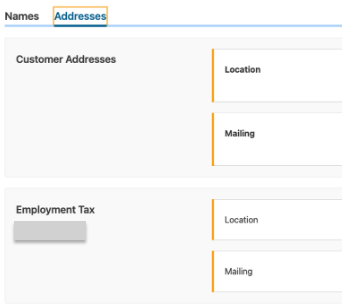
3) Addresses tab → add or update the mailing address for your Employment Tax with your Mosey mailroom address
4) Click "Next and Submit."
Colorado
Withholding Tax
1) Login to your Revenue Online account
2) Select More... → Names & Addresses → Manage Names & Addresses
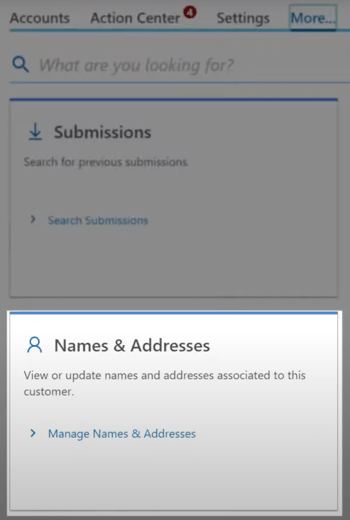
3) Addresses tab → add or update the mailing address for your withholding account to match your Mosey mailroom address
Unemployment Insurance
1) Log in to your MyUI Employer+ account.
2) Find the "Account Maintenance" tab in the left-hand table.
3) Click on Mailing
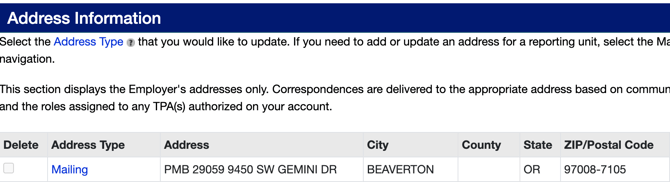
4) Update the mailing address to your Mosey Mailroom address and click "Submit." Please note: address updates are generally processed in two (2) business days
Denver Occupational Privileges Tax (OPT)
1) Log in to Denver eBiz Tax Center
2) Click More... → Names & Addresses → Manage Names & Addresses
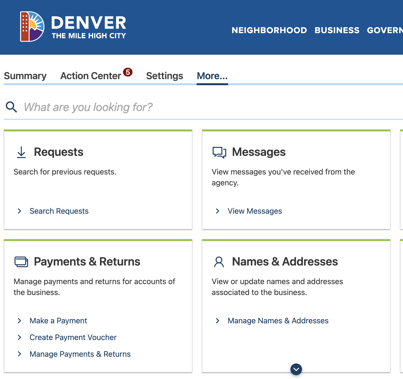
3) Select the Addresses tab → add or update your OPT account mailing address to match your Mosey mailroom address
Connecticut
Withholding Tax
2) Navigate to More → Taxpayer Updates → Manage Names & Addresses
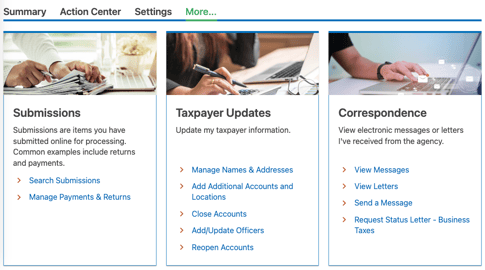
3) Addresses tab → add or update the mailing address for your withholding account with your Mosey Mailroom address
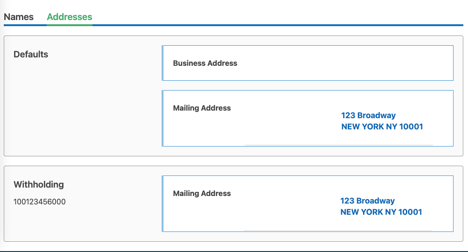
4) Click "Submit."
Unemployment Insurance
1) Log in to your ReEmployCT account
2) Account Maintenance → Maintain Address → confirm your UI account number
3) Update your Unemployment tax mailing address to match your Mosey mailroom address
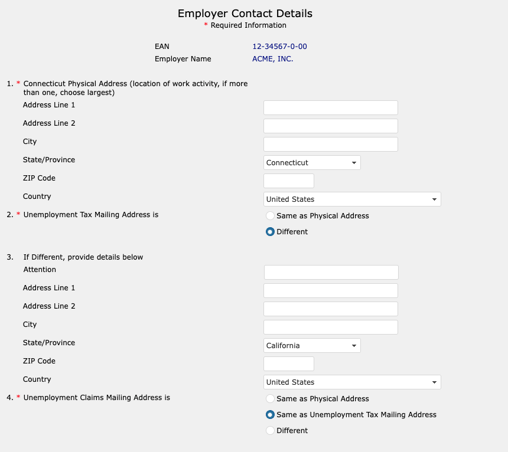
4) Update your Unemployment claims mailing address to match your Mosey mailroom address
5) Enter contact information → click "Submit."
Delaware
Withholding Tax
1) Log in to your Delaware Taxpayer Portal
2) Select your withholding tax account
3) Add or update the mailing address to the Mosey Mailroom address
Unemployment Insurance
1) Email DOL_UI_Employer_Tax_Questions@delaware.gov to update your account mailing address to match your Mosey Mailroom address. Include the following information in your email:
- Legal Name
- UI account number
- Current mailing address
- New mailing address (i.e. Mosey Mailroom address)
District of Columbia (DC)
Withholding Tax
1) Log in to your MyTax DC account
2) Go to your account homepage → click Names and Addresses
3) Select the mailing address for your Withholding Tax account → click add or edit
4) Add or update your mailing address to match your Mosey mailroom address
Unemployment Insurance & Paid Family Leave
2) Select Account Maintenance → Employer Maintenance
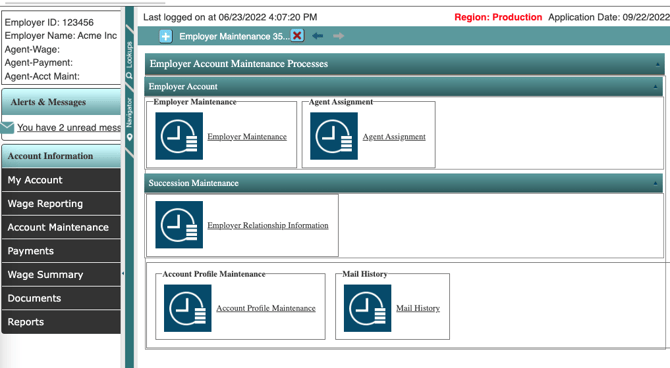
3) Address Summary → select the checkbox next to your current mailing address → click Open
4) Enter your Mosey Mailroom address → click Save
Florida
Unemployment Insurance
1) Go to the Request a Change of Business Name, Address, and/or Account Status form
2) “Select the type of change(s) you are requesting” → select "Address Change"
3) Enter your FEIN, RT number (i.e., UI account number), and current account information
4) Tax Type → select Reemployment Tax
5) Change your address → Address Type → Mailing Address
6) Enter your Mosey mailroom address
7) Enter contact information → click Submit
Georgia
Withholding Tax
1) Log in to your Georgia Tax Center account
2) Click More… → Names & Addresses → Manage Names & Addresses
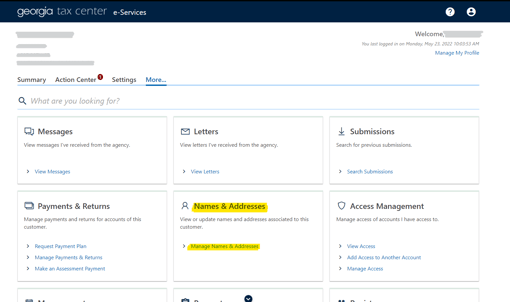
3) Addresses tab → add or update the mailing address for your withholding account with your Mosey mailroom address
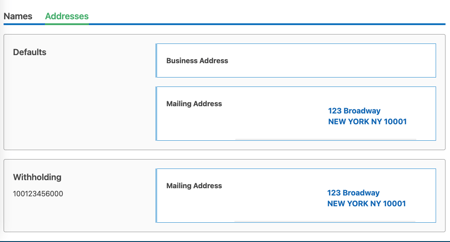
4) Click "Submit."
Unemployment Insurance
1) Log in to Georgia’s employer portal
2) On the left-hand side of the screen, click “Employer Dashboard.”
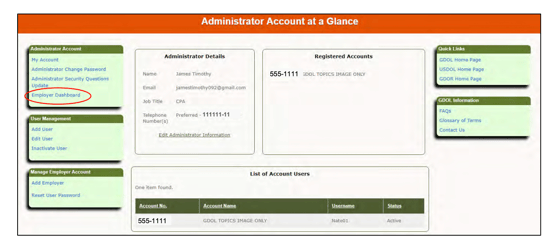
3) From the “Employer Dashboard” page → “Common Links” → “Change employer address.”
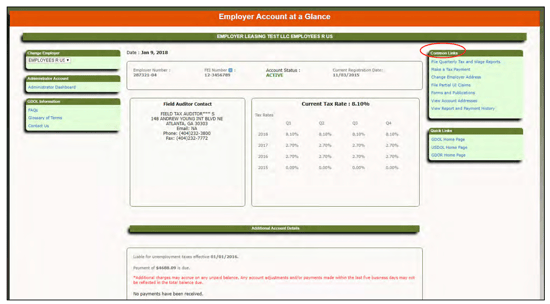
4) Update the mailing address to match your Mosey mailroom address
Hawaii
Withholding Tax
1) Log in to your Hawaii Tax Online Account
2) Select More…→ Manage Names & Addresses
3) Select Update Mailing Address
4) Enter in Mosey Mailroom Address…→ Verify address …→Submit
Unemployment Insurance
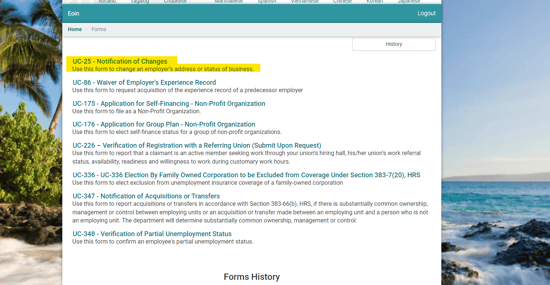
2) Scroll down and Select “Forms.”
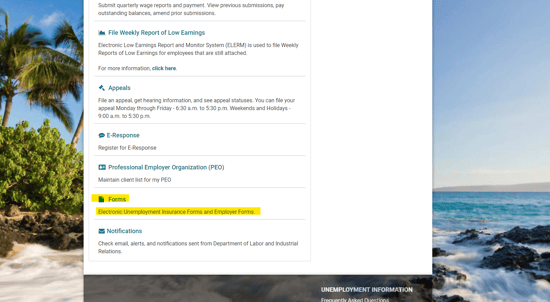
3) Select “UC-25- Notification Changes”
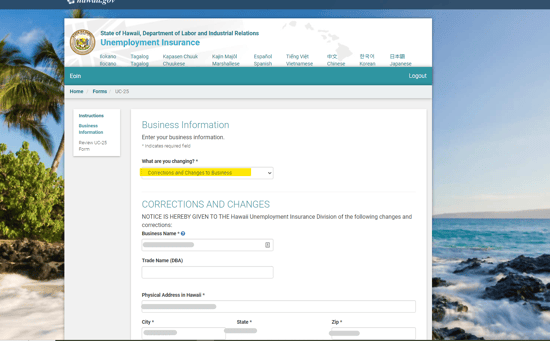
4) Select “Correction and Change to Business” and scroll down to Mailing Address
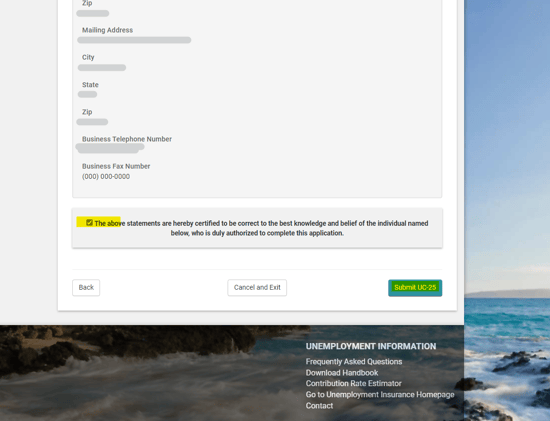
5) Make sure you check the agreement box and Submit UC-25 Form
Idaho
Withholding Tax
1) Go to Business Taxpayer Self-Service
2) If you have a TAP login:
a) Log in to your TAP account
b) Click More… → Names & Addresses → Manage Names & Addresses
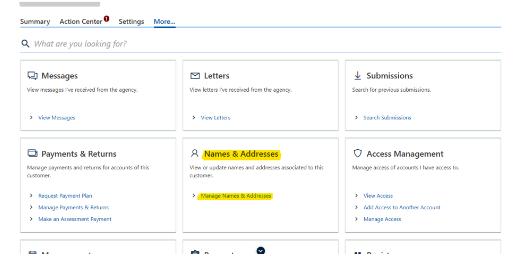
c) Addresses tab → add or update the mailing address for your withholding account with your Mosey mailroom address
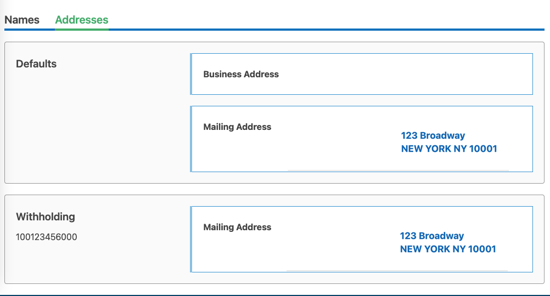
d) Click "Submit."
3) If you don't have TAP:
a) Scroll to the end of the page for the change request form
b) Check “Change mailing address” → enter your account information
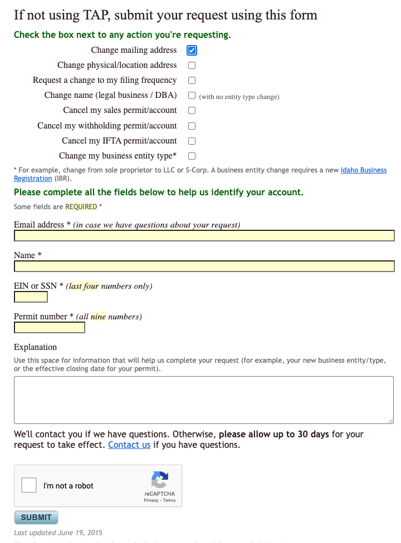
c) In the “Explanation” section, enter your Mosey mailroom address as your new mailing address → click "Submit."
Unemployment Insurance
1) Log in to the Idaho Employer Portal
2) Click "Add or Select Employer."
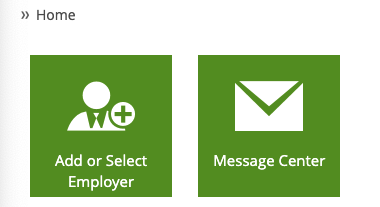
3) Select the Employer from the list if you have more than one
4) Click “Addresses and contacts.”
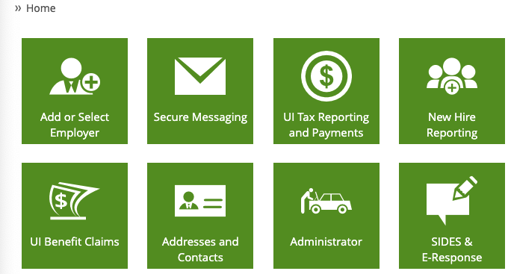
5) Under “Address Management,” click “UI tax reporting and payments.”
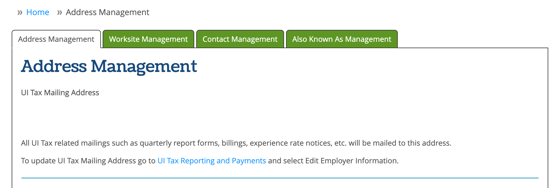
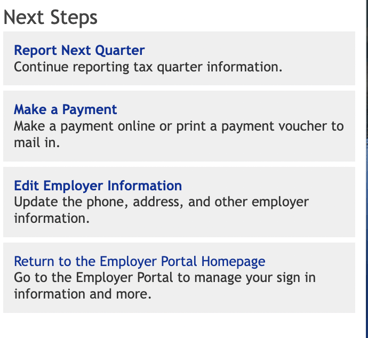
6) On the right-hand side of the screen, select “Edit employer information.”
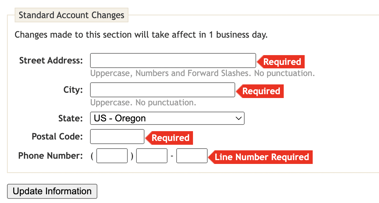
7) Scroll down to the bottom of the screen, add the new address, and then click “Update information:
Illinois
Withholding Tax & Unemployment Insurance
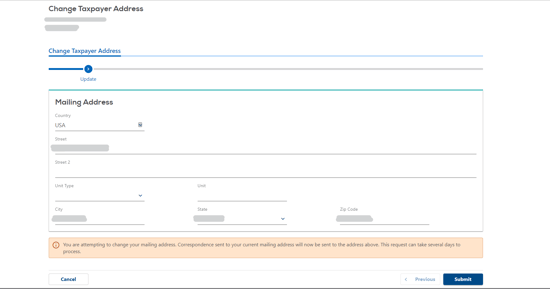
1) Log in to your Mytax Illinois account
2) Select More… → Names & Addresses → Manage Names & Addresses
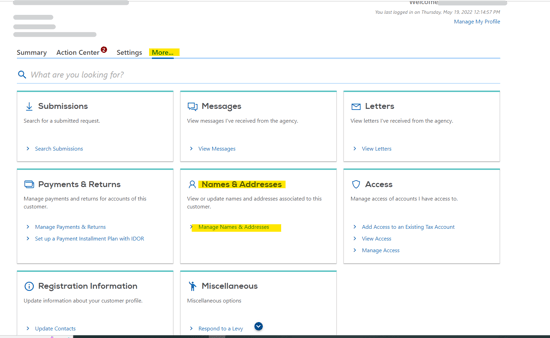
3) Select the Addresses tab →Click on the “Change My Address” button
4) Add or update the Mosey Mailroom address as the mailing address, then click “Submit” at the bottom of the page
Indiana
Withholding Tax
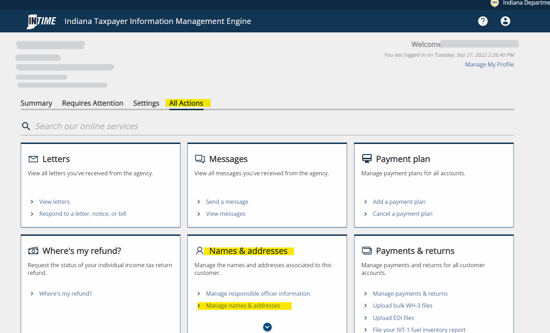
1) Log in to your INTIME account
2) Select All Actions… → Names & Addresses → Manage Names & Addresses
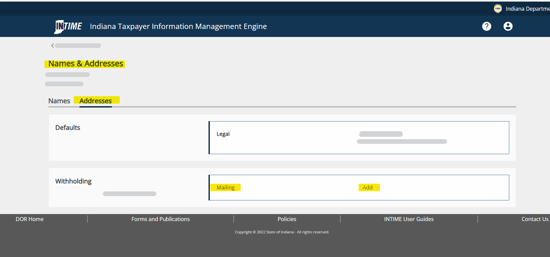
3) Select Addresses… → Add mailing address
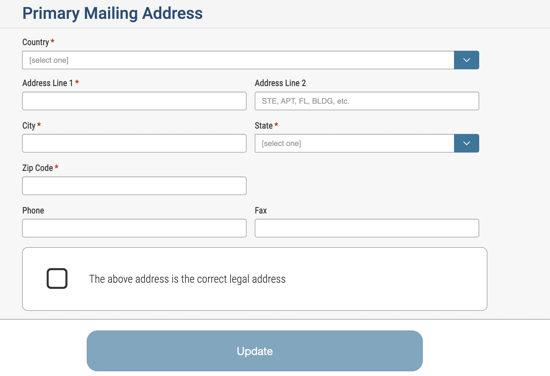
4) Add or update the Mosey Mailroom address as the mailing address, then click “Next” at the bottom of the page
5) Review and Submit
Unemployment Insurance
1) Log in to Employer Self Service
2) On the left-hand menu, select Profile Maintenance → Legal Information
3) On the Legal Information Page, scroll down, enter the new address, and click update
Iowa
Withholding Tax
1) Log in to your Gov Iowa Connect account
2) Select More…→ Manage Names & Addresses
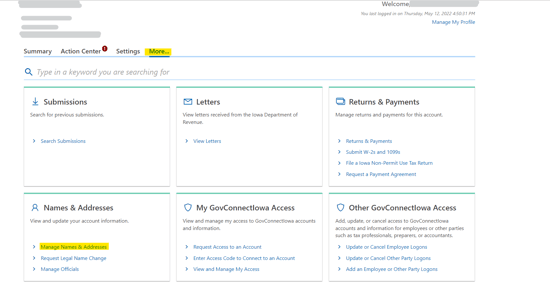
3) Select the Addresses tab → add or update the Mosey Mailroom address as the mailing address for Withholding Tax and the Default mailing address
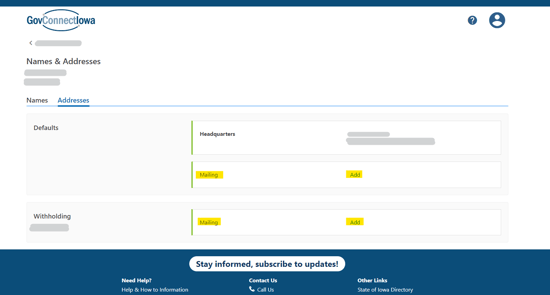
4) Verify the address, then click "Submit."
Unemployment Insurance
1) Log in to your My Iowa account
2) Click "Change Address" (located under "My Quick Links" menu on left-hand side)
3) Fill in your Mosey Mailing Address in Tax Mailing Address and click "Save."
Kansas
Withholding Tax
1) Complete the Name or Address Change Form (Form DO-5). Click on the link to download the form.
2) Mail to: KDOR - Taxpayer Assistance Center, PO Box 3506, Topeka, KS 66625-3506 or fax to 785-296-2073.
Unemployment Insurance
1) Log in to your Kansas Department of Revenue account
2) Select “Maintain Account Information and View Tax Rate.”
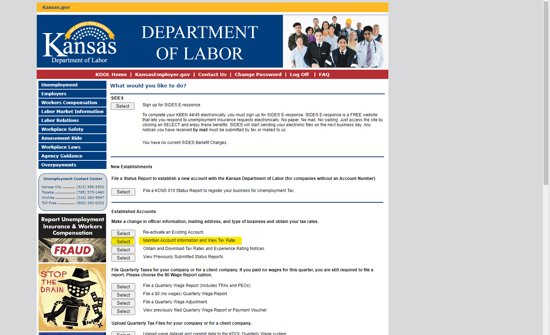
3) Fill out the Mosey Mailroom address as the mailing address
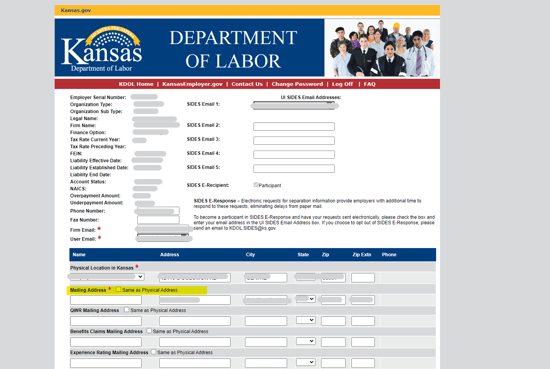
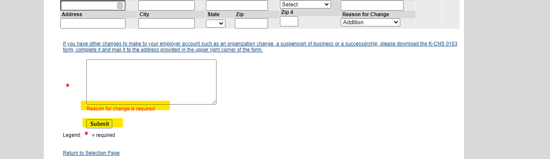
4) Enter “New mailing address” as the reason for change → click “Submit.”
Kentucky
Withholding Tax
1) Download "Update Or Cancellation Of Kentucky Tax Account(s)" (Form 10A104)
2) In Section A, enter your withholding account number, today’s date, and check “Update mailing address(es).”
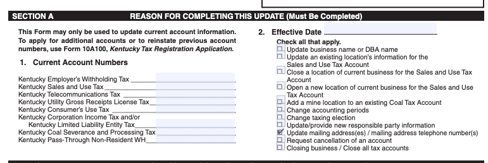
3) Enter your account details in Section B
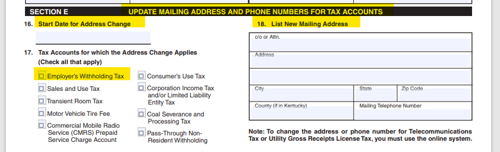
4) In Section E, fill out 16 to 18 sections with today’s date, withholding tax, and Mosey Mailroom Address.
5) Email the completed form to DOR.WEBResponseDataIntegrity@ky.gov
Unemployment Insurance
2) Once you’ve logged in, on the left-hand side of the screen, click “Address Update.”
3) Change the mailing address to match your Mosey mailroom address and hit submit.
For additional support, you can refer to the Kentucky Unemployment Insurance Employer Guide (PDF)
Louisiana
Withholding Tax
1) Log in to your LaTAP account
2) Select “More” from the homepage, and then click on “Manage Names & Addresses” under the “Names & Addresses” section
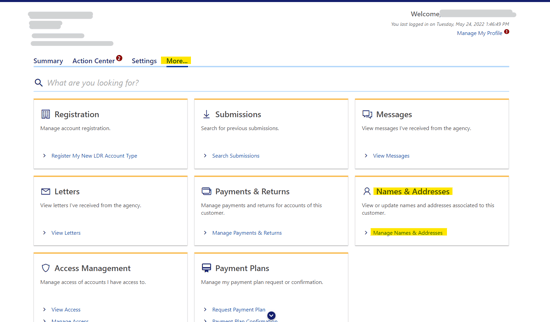
3) Select the Addresses tab → add or update the Mosey Mailroom address as the mailing address for Withholding Tax and the Default mailing address
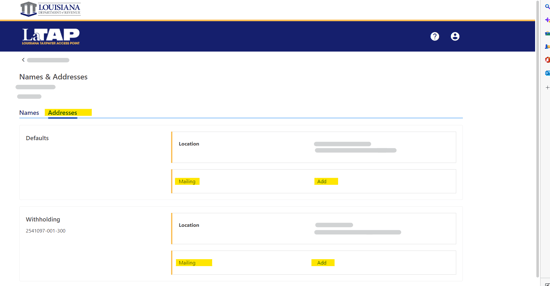
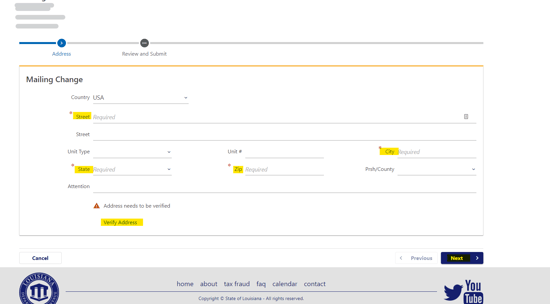
4) Entering your Mosey Mailroom address → verify the address → click “Next” to submit the change
Unemployment Insurance
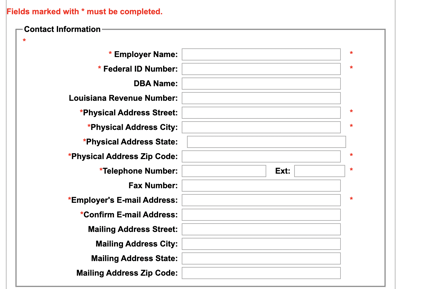
2) On the left-hand side of the screen, find Employer Services
3) Now, click on “Report of Change.”

4) Scroll down, and, in the "Add New Contact" section, add the new mailing address
Maine
Withholding Tax
1) Log in to your Maine Tax Portal account
2) Click the More tab on the homepage
3) In the Names & Addresses section click Manage Names & Addresses
4) On the Addresses tab Add/update your Withholding Tax mailing address to your Mosey mailroom address → click Save
Unemployment Insurance
1) Log in to your Unemployment Services account
2) Click the Account Maintenance tab then Maintain Address on the homepage
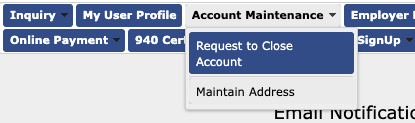
3) Enter your EAN and click next
4) Add/update your Unemployment Insurance mailing address to your Mosey mailroom address → click Save

Maryland
Withholding Tax
1) Log in to your Maryland Tax Connect account.
2) Find "Profile Information" in the top header.
3) Select "View Account Information."
4) Under Mailing address, select the pencil icon, and then update the mailing address to the Mosey Mailroom.
Unemployment Insurance
1) Log in to the Maryland Department of Labor Unemployment Insurance portal
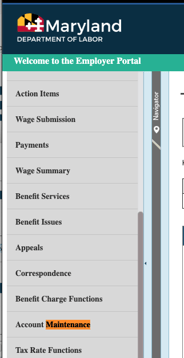
2) Select “Account Maintenance” → “Employer Maintenance.”
3) Select “Employer Maintenance.”
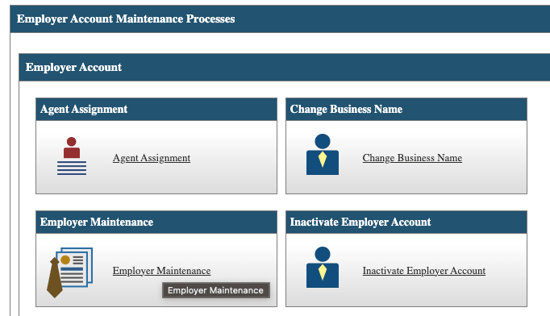
4) Select the “Address Summary” tab → select your mailing address

5) Update your mailing address to match your Mosey mailroom address.
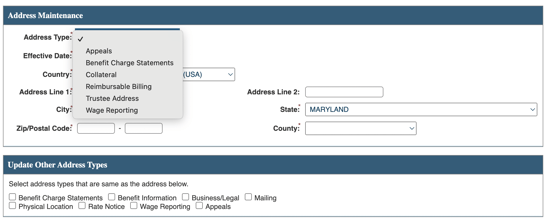
6) For “Update other address types”, select all options except “Physical Location” and “Business/Legal” → click “Save.”
Massachusetts
Withholding Tax and Paid Family & Medical Leave
1) Log in to your MassTaxConnect account
2) Click More… → Names & Addresses → Manage Names & Addresses
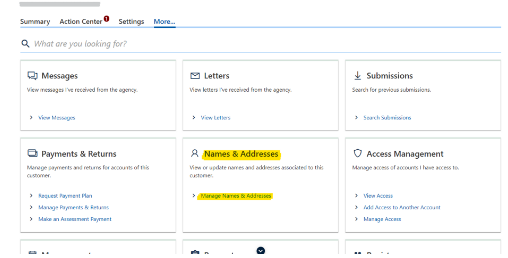
3) Addresses tab → add or update the mailing address for your withholding account with your Mosey mailroom address
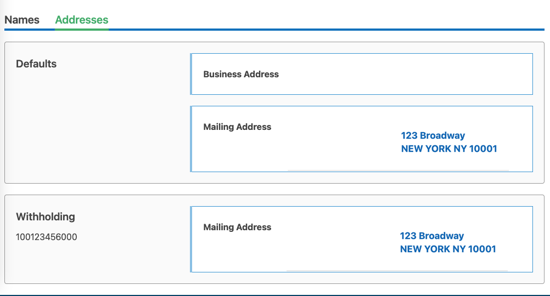
4) Click Submit
Unemployment Insurance
1) Log in to your Massachusetts Department of Unemployment Assistance account
2) Click “Additional Services” in the top header
3) Find the "Business Information" box.
4) Select “Manage Names and Addresses” in the "Business Information" box.
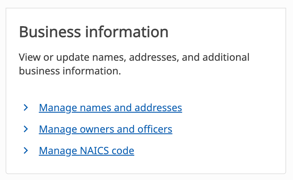
5) Select "Addresses" and then add the Mosey Mailroom mailing address.
Michigan
Withholding Tax
1) Log in to your Michigan Treasury Online account
2) Click “Manage Business Registration.”
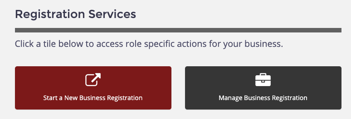
3) Select your business if you have multiple
4) Scroll to Registration Actions> click Manage My Business> click “Business Addresses.”
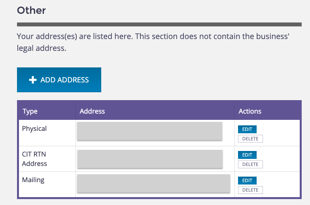
5) Scroll to Other, find your mailing address, and click “Edit” under actions
Unemployment Insurance
1) Log in to your MiWAM For Employers account
2) Click on Accounts and then UI Tax
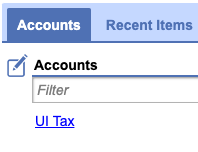
3) Click on Names and Addresses

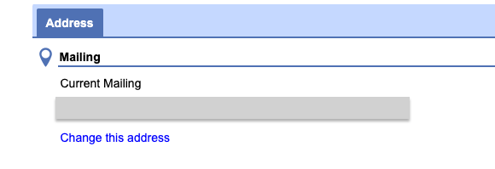
4) Click on the Mailing Address to edit
5) Click Change this address and update to match your new Mosey mailroom address
Minnesota
Withholding Tax
2) From the homepage, select “I Want To…”
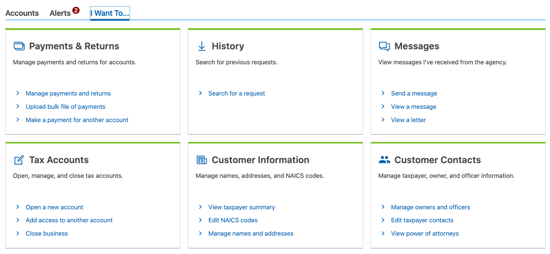
3) Then select under “Customer Information,” “Manage names and addresses.”
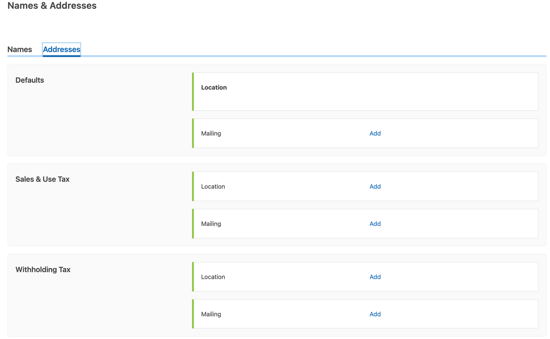
4) Under “Addresses,” select “Mailing” under “Defaults.”
5) Add the address, make sure it’s verified, and save
Unemployment Insurance
1) Log in to the Minnesota Unemployment Insurance (UI) System
2) On My Home Page, click Account Maintenance
3) Click Address Information
4) Under the Address Type column, select the link for the mailing address
5) Change address information to match your new Mosey mailroom address, and then click Save
6) Make sure to validate and submit your changes
Mississippi
Withholding Tax
1) Log in to your Mississippi TAP account
2) Click More… → Names & Addresses → Manage Names & Addresses
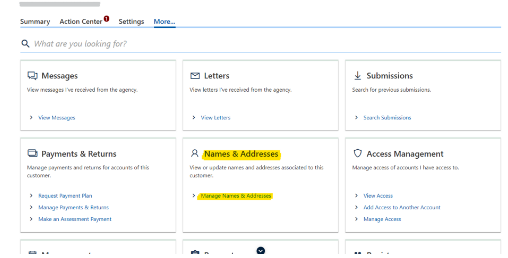
3) Addresses tab → add or update the mailing address for your withholding account with your Mosey mailroom address
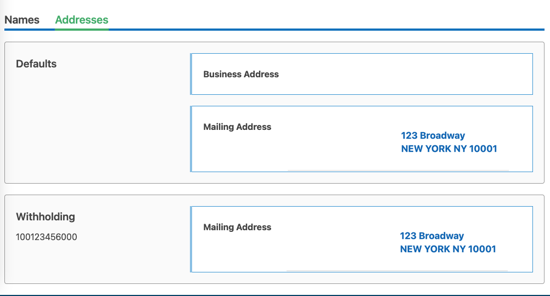
4) Click submit
Unemployment Insurance
1) Log in to your Mississippi Department of Employment Security account
2) Click the “Account Maintenance” tab and select “Maintain Address.”
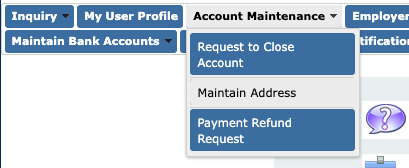
3) Enter your EAN number and click next
4) Update your Unemployment Insurance mailing address to match your Mosey mailroom address
Missouri
Withholding Tax
1) Log in to your MyTax Missouri account.
2) Find "Profile Maintenance" in the top header.
3) Select "Edit Taxpayer Information."
4) Find "Mailing address" and then select the pencil icon.
5) Update the mailing address to the Mosey Mailroom address.
Unemployment Insurance
1) Log in to Missouri Unemployment Insurance (UInteract)
2) From the homepage, select the “Account Maintenance” tab and hover over to select “Maintain Address.”
3) Update both “Claim Mailing Address” and "Tax Mailing Address."
5) Hit “Submit” at the bottom of the page
Kansas City Earnings Tax
1) Log in to KC Missouri Quick Tax
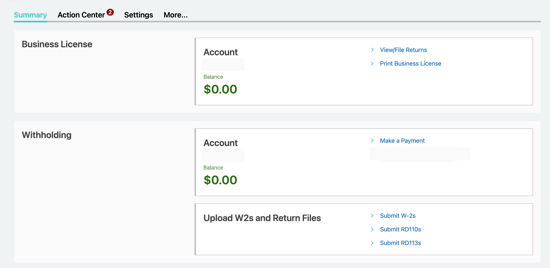
2) Select “More” from the homepage
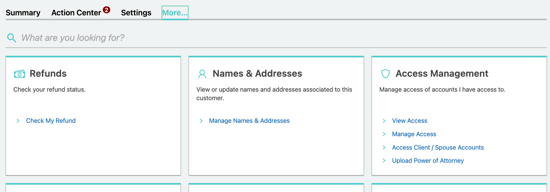
3) Select “Manage Names & Addresses” under “Names & Addresses
4) Select “Addresses.”
5) Select “Mailing” and update the address
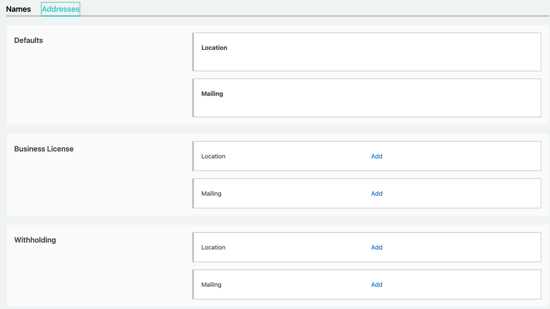
6) Make sure to verify the address before saving
Montana
Withholding Tax
1) Log in to the Montana DOR TransAction Portal
2) Select “More” from the homepage, and then click on “Manage Names & Addresses” under the “Names & Addresses” section
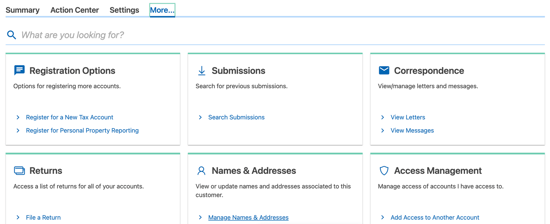
3) Select “Addresses” and if it won’t let you edit defaults, select the “Mailing” addresses below
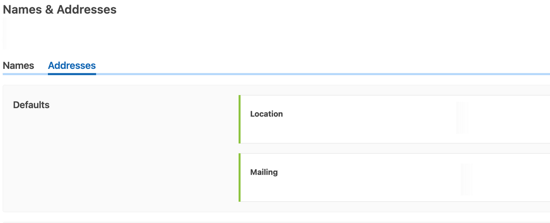
4) Make sure you verify the address before submitting (and the PMB is included in it) and hit submit
Unemployment Insurance
1) Log in to your Montana UI eServices for Employers account
2) Under Names and Addresses at the top of the first screen after logging in, click on the blue “Address” hyperlink
3) Update your Unemployment Insurance mailing address to match your Mosey mailroom address
Nebraska
Withholding Tax
1) Fill out Nebraska Change Request (Form 22)
2) Mail the completed form to the Nebraska Department of Revenue
Nebraska Department of Revenue
PO Box 98903
Lincoln, NE 68509-8903
Unemployment Insurance
1) Sign in to your NE Works Account
2) At the top of the webpage, click on "Profile."

3) Click the “Locations” tab
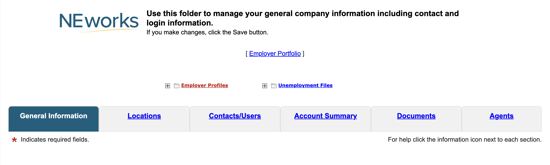
4) Click the “Add Location” or ”Edit Location” button and add your Mosey mailing address, making sure to check the “All Mailings” box under the “Designations” section before saving

Nevada
Modified Business Tax
1) Log in to your My Nevada Tax Center account
2) Next to the "Welcome" banner, select "I want to..."
3) Scroll down to "More" and select "View more options..."
4) Under "Demographic Management," select "Manage Contact Information"
5) From there, update all mailing addresses to the Mosey Mailroom mailing address.
Unemployment Insurance
1) Login to your Nevada Department of Employment, Training & Rehabilitation Employer Self Service account
2) Click the “Profile Maintenance” link from the left-hand menu
3) Then click the “Locations” link
4) Update your Unemployment Insurance mailing address to match your Mosey mailroom address
New Hampshire
Unemployment Insurance
1) Log in to New Hampshire's Unemployment Insurance System (NHUIS)
2) Account Review and Maintenance → View Reset Preferences → Corporate Preferences for Notifications
3) Add or update the Mailing Address to match your Mosey mailroom address → click Save
New Jersey
Withholding Account & Unemployment Insurance
2) Click “Access Premier Services.”
3) Click Update Profile
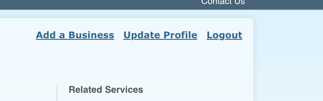
4) Update the mailing address to your Mosey Mailroom address
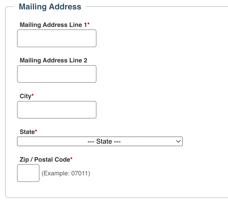
5) Click "Submit."
NJ Division of Revenue
1) Log in to On-Line Registration Change Service
2)Select Change my address and click Submit
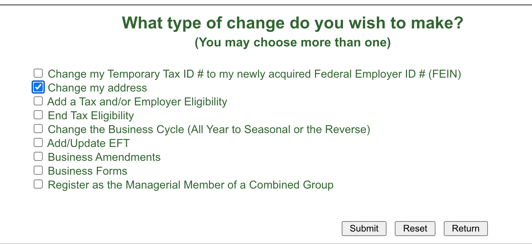
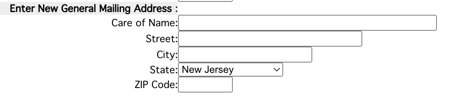
3) Under Enter New General Mailing Address, add your Mosey Mailroom address and click Submit (do not fill out New Location Address)
New Mexico
Withholding Tax
1) Login to your New Mexico Taxpayer Access Point account
2) Click More… → Names & Addresses → Manage Names & Addresses
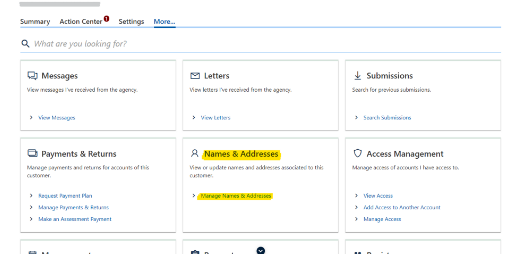
3) Addresses tab → add or update the mailing address for your withholding account with your Mosey mailroom address
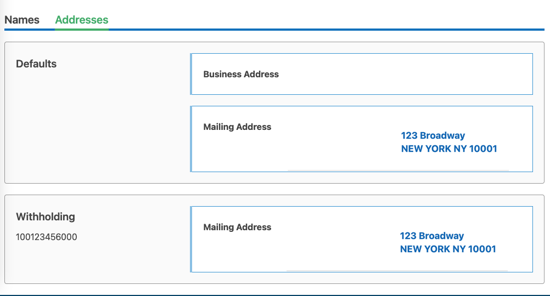
4) Click "Submit"
Unemployment Insurance
1) Login to your New Mexico Department of Workforce Solutions account
2) Click “Account Maintenance” on the left menu, then click “Address Information.”
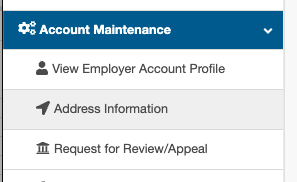
3) Click "Mailing"
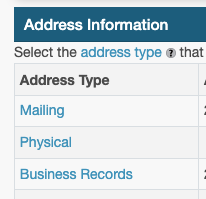
4) Update your Unemployment tax mailing address to match your Mosey mailroom address
New York
Withholding Account & Unemployment
This will change the mailing address for both the withholding tax account and unemployment insurance account.
1) Login to NY DTF Online Services
2) Click Tax Online Services

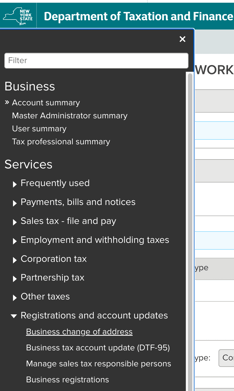
3) Click menu → Registrations and account updates → Business change of address
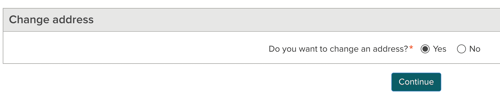
4) Under Change address, select Yes then Continue
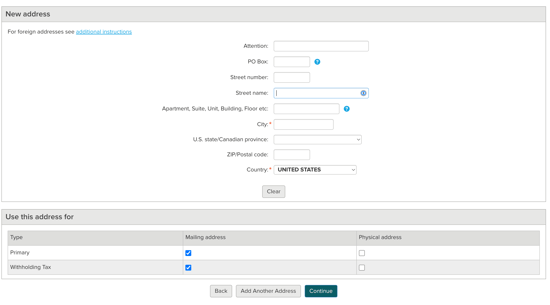
5) Add your Mosey Mailroom address
6) Select Mailing Address for all account types then click continue
7) You’ll be asked to check your phone number then click Submit

North Carolina
Withholding Tax
1) Download Form NC-AC Business Address Correction
2) Mail to:
North Carolina Department of Revenue
P.O. Box 25000
Raleigh, North Carolina 27640-0001
Unemployment Insurance
2) Under Quick Actions → Change Address/Phone
3) Click “Mailing” under the Address Type Column
4) Update the mailing address to your Mosey mailroom address and click save.
North Dakota
Withholding Tax
1) Visit the North Dakota TAP Webpage
2) Select "I want to..."
3) Under Electronic Requests, find "Update Names & Addresses"
4) Update your Withholding Tax mailing address to match your Mosey mailroom address
Unemployment Insurance
1) Login to your North Dakota UI Easy account
2) Scroll to “UI Tax Account Management” and click “View/Change UI Tax Account Information”
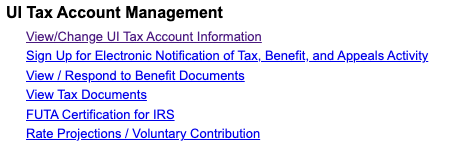
3) Under “Account Information” click “Edit Account Profile”
4) Enter you Mosey Mailroom address and click submit
Workers' Compensation Insurance
1) Contact Customer Service at 800-777-5033 or 701-328-3800 to update the mailing address to match your Mosey mailroom address for your myWSI account
Ohio
Withholding Tax
2) Select “Open App” for The Ohio Business Gateway
3) Select the profile icon on the right hand side of the page

4) Select “Company Information” and then go to “Company Addresses” and select “Create New Address”
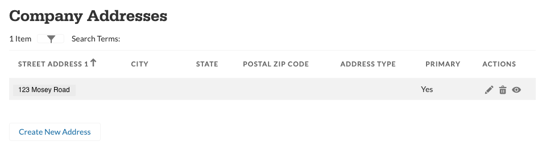
5) For “Address Type” select “Mailing Address”
6) Make sure to validate the address before saving
Unemployment Insurance
1) Log in to your Ohio Unemployment Insurance online account
2) On the home page, scroll down to the “Quick Actions” section
3) Click “Change Address/Phone”
4) Update your Unemployment tax mailing address to match your Mosey mailroom address
Workers Compensation
1) Log in to the Bureau of Workers’ Compensation online portal
2) Under “Company Information” click “Update”
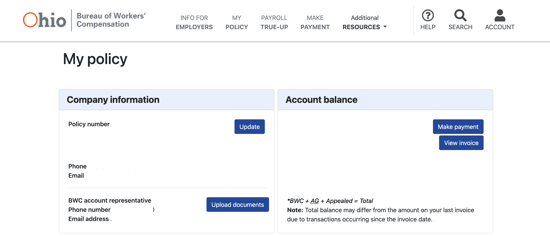
3) Scroll down to the “Mailing” section, click the “+” and click “update”
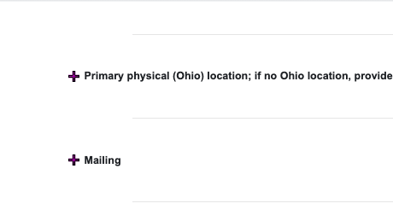
4) Update your Workers’ Compensation mailing address to match your Mosey mailroom address and click “ok”
Oklahoma
Withholding Tax
2) Click More… → Names & Addresses → Manage Names & Addresses
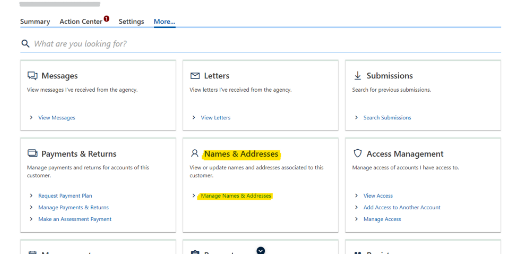
3) Addresses tab → add or update the mailing address for your withholding account with your Mosey mailroom address
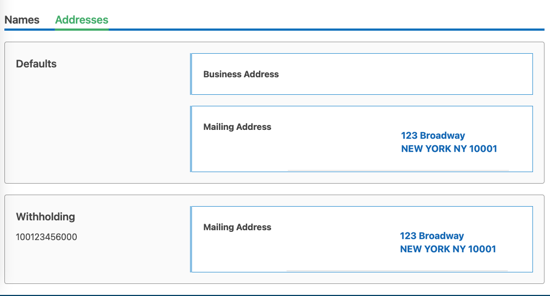
4) Click "Submit"
Unemployment Insurance
1) Log in to Oklahoma Employment Security Commission
2) Select “Mailing Address” on the left-hand menu under “Manage Employer Information”
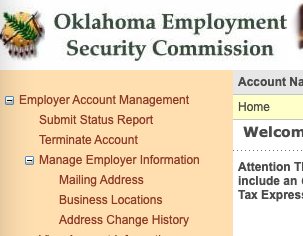
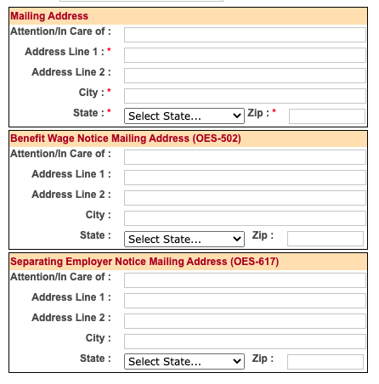
3) Enter the mailing address in the first box (no need to enter in second and third), make sure to select “Save” at the bottom of the screen
Oregon
Withholding Tax & Unemployment Insurance
1) Login to your Frances Online account
2) Click the “I Want To…” tab
3) Click “Manage Names & Addresses” on the “Names, Addresses, & Contacts” panel
4) Update your mailing address to match your Mosey mailroom address and click “Save”
Pennsylvania
Withholding Tax (myPath)
1) Log in to your myPATH account
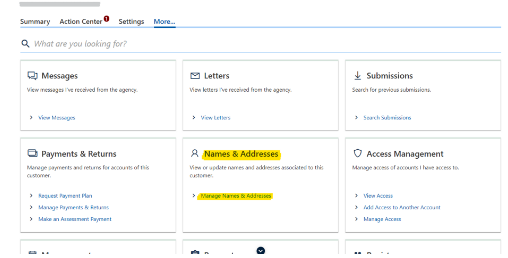
2) Click More… → Names & Addresses → Manage Names & Addresses
3) Addresses tab → add or update the mailing address for your withholding account with your Mosey mailroom address
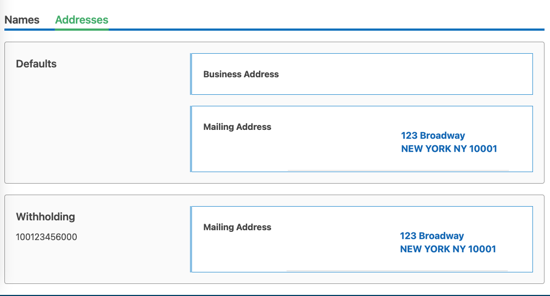
4) Click "Submit"
Unemployment Insurance
1) Log in to your UC Tax account
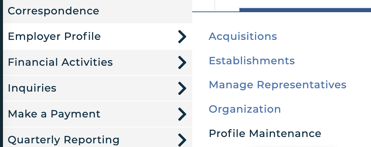
2) Employer Profile → Profile Maintenance → select Addresses tab
3) Click “edit” next to your mailing address → Update your mailing address to match you Mosey mailroom address
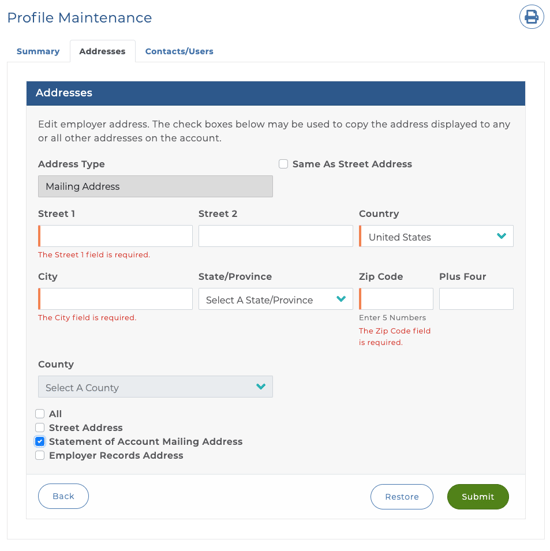
4) Select Statement of Account Mailing Address → click Submit
Rhode Island
Withholding Tax
1) Log in to your RI Tax Portal account
2) Go to Service Requests and select "New Service Request"
3) Select the request type "Update Tax Account Address"
4) In the Reason for Request box, enter: "Update my mailing address."
5) Enter the Mosey Mailroom mailing address in the form below and submit.
Unemployment Insurance
Contact the Dept. of Labor and Training’s Employer Tax Unit at (401) 574-8700 to change your account mailing address to match your Mosey mailroom address.
South Carolina
Withholding Tax
1) Log in to South Carolina Department of Revenue account
2) Select “More” from the homepage, and then click on “Manage Names
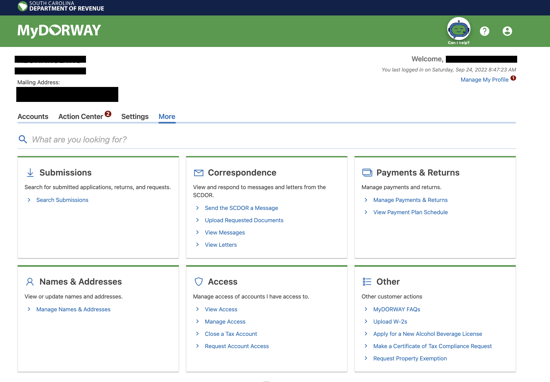
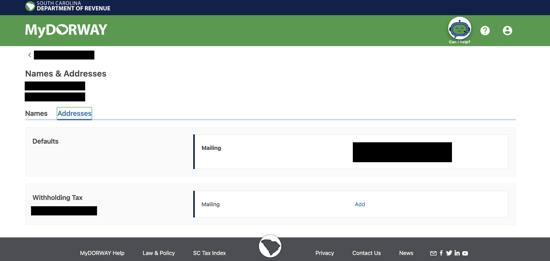
3) Select “Addresses” and click on the addresses (blacked out below, but will appear in blue on your screen)
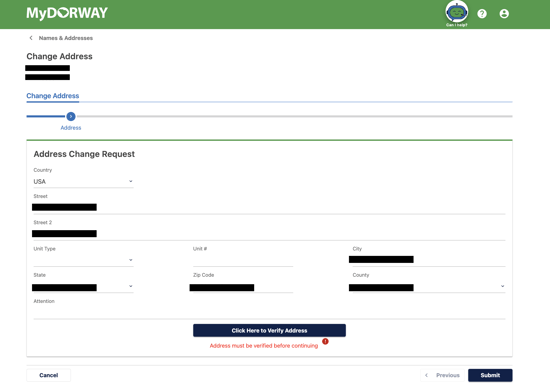
4) Update the address, and make sure to “Click here to verify address” before hitting “Submit”
5) The address change will be confirmed via email in a few days
Unemployment Insurance
1) Log into the South Carolina State Unemployment Insurance Tax System
2) Select “Change Address/Phone” from the “Quick Action” section on the Home Page
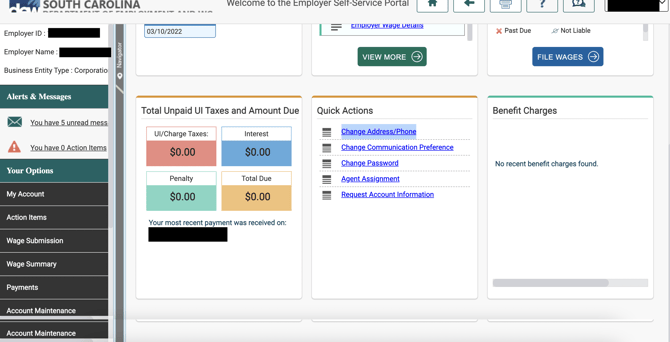
3) Click the “New” button under the “Address Summary” tab under the “Other Information” section

4) Click on the mailing address and edit to update the mailing address. Make sure to hit validate and save
South Dakota
Unemployment Insurance (Reemployment Assistance)
1) Log in to your Employer RA account
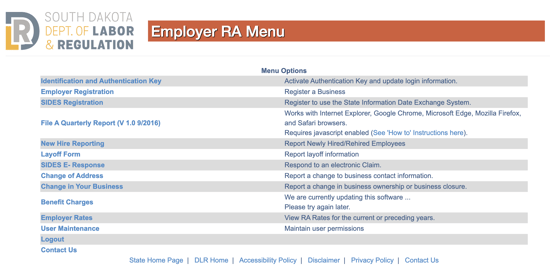
2) Select “Change of Address” → update the mailing address to match your Mosey mailroom address
3) If the system can’t process the address change request, you will need to send a written request on company letterhead via snail mail to:
SDDLR
PO Box 4730
Aberdeen, SD 57401
Tennessee
Unemployment Insurance
1) Log in to your Jobs4TN Employer e-Services account.
2) Go to "More..."
3) Under "Account Management," select "Manage Addresses"
4) Add the Mosey Mailroom mailing address
Texas
Unemployment Insurance
1) Log in to Unemployment Tax Services
2) Go to My Profile → Additional Information
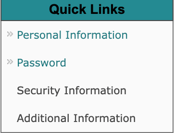
3) Update the address to match your mailroom address
Utah
Withholding Tax
1) Login to TaxExpress
2) Click More… → Names & Addresses → Manage Names & Addresses
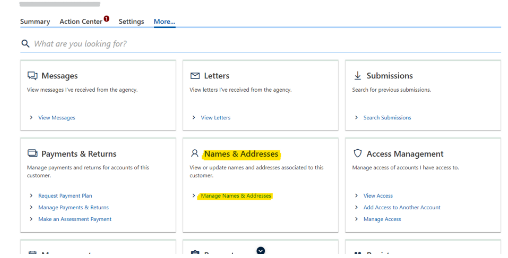
3) Addresses tab → add or update the mailing address for your withholding account with your Mosey mailroom address
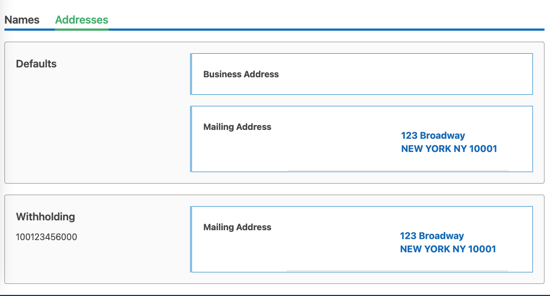
4) Click "Submit"
Unemployment Insurance
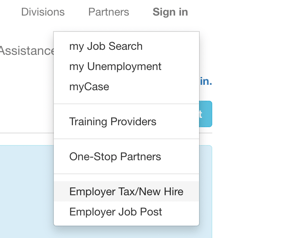
1) Go to Workforce Services and click Sign in → Employer Tax/New Hire
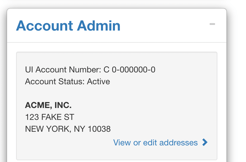
2) Under Account Admin, click View or edit addresses
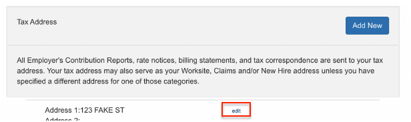
3) Under Tax Address, click “edit”
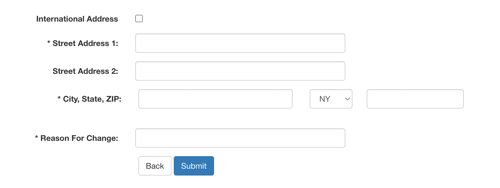
4) Enter your Mosey Mailroom address and click Submit
Vermont
Withholding Tax
2) Click "I Want To" → "Manage Names and Addresses"

3) Click the Addresses tab
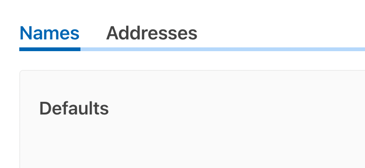
4) Update the Default → Mailing address by clicking on the address link. Enter your Mosey Mailroom address and click Submit. Do not change your Location address.

5) Update your Withholding → Account Mailing address by clicking on the address link. Enter your Mosey Mailroom address and click Submit. Do not add or change your Location address.

Unemployment Insurance
To update your mailing address to the Mosey Mailroom mailing address, you will need to contact the Vermont Department of Labor directly at (802) 828-4000.
Virginia
Withholding Tax
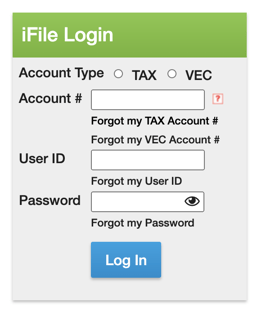
1) Log in to your Virginia Tax account (use ithe iFile Login, and make sure to select “TAX” as the account type)
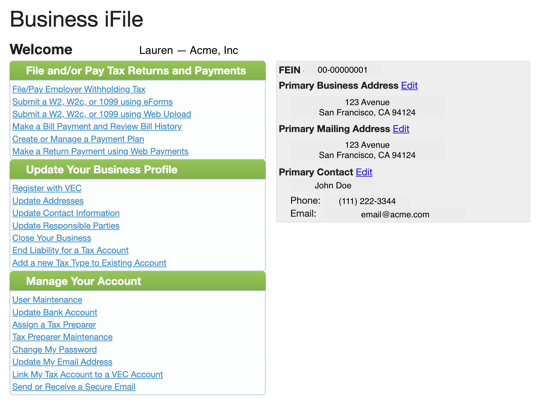
2) From the homepage, select “Primary Mailing Address” and “Edit”
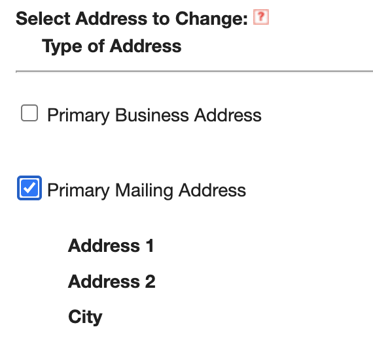
3) Select “Primary Mailing Address,” and edit the address and save
Unemployment Insurance
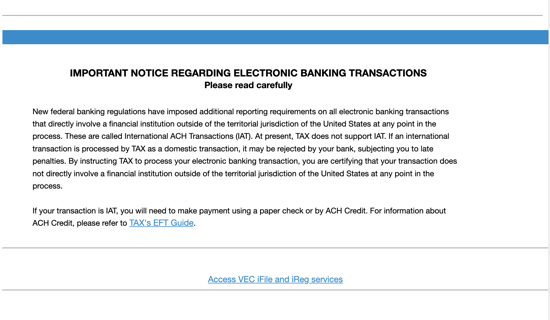
2) Select your VEC account → select “Access VEC iFile and iReg Services”
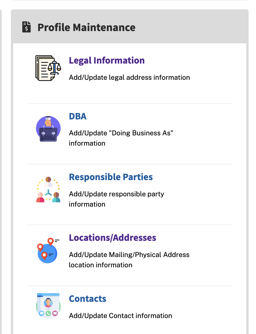
3) In Employer Self Service System, select Profile Maintenance → Locations/Addresses
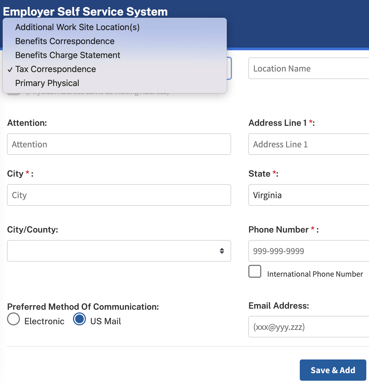
4) Update your “Tax Correspondence” address to match your Mosey mailroom address → click Save & Add
Washington
Excise Tax & Business License
2) Click "Get Started"
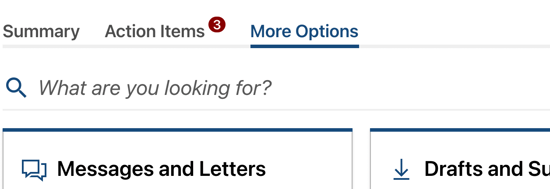
3) Click "More Options"
4) Under Names and Addresses, click Update Mailing and Location Addresses
5) Click the address link in the Excise tax section, click Change This Address, and update the mailing address to your Mosey Mailroom address

6) Go back to the Update Mailing and Location Addresses page
7) Click the address link in the Business License section, click Change This Address, and update the mailing address to your Mosey Mailroom address
Workers' Compensation Insurance
2) Click on Insurance
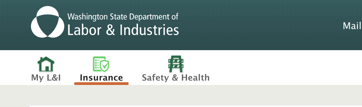
3) Click Request a change to your account information
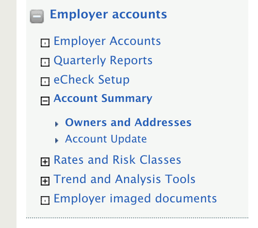
4) Click Owners and Addresses → Account Addresses
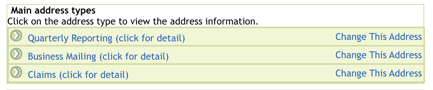
5) Change each “Main address types” to your Mosey Mailroom address
Unemployment Insurance & Paid Family and Medical Leave
Fill out the business change form (Form 5208C-1) and email it into the Washington Employment Security Division.
West Virginia
Withholding Tax
2) Select “More”

3) Select “Manage Names & Addresses” under “Names & Addresses”
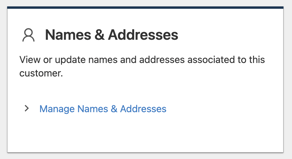
4) Select “Addresses”

5) Under “Defaults” select “Mailing” and update and submit
Unemployment Insurance
1) Log in to Online Employer Services
2) Select Change Employer Account Information → Change Information
3) Update the mailing address to match your Mosey mailroom address → Submit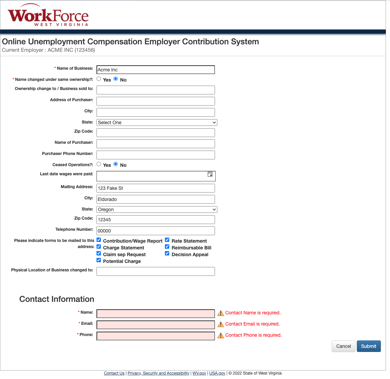
Wisconsin
Withholding Tax
1) Log in to Wisconsin Department of Revenue — My Tax Account
2) Select “More” and then “Manage Names and Addresses” under “Names and Addresses”
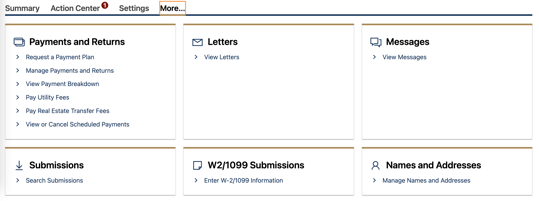
3) Select “Addresses” and then “Mailing”
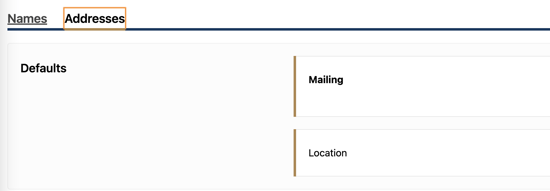
4) Update address, verify, and submit!
Unemployment Insurance
1) Log in to UI Employer Online Services with your DWD account
2) Add or update the account mailing address to match your Mosey mailroom address
Wyoming
Unemployment Insurance & Workers' Compensation Insurance
1) Log in into your WYUI account
2) Click Account Maintenance → Maintain Address
3) Add or update the mailing addresses for Unemployment and Workers Compensation to match your Mosey mailroom address